• Skip to main content

MoverCalcs

  • Home
  • Help
  • MoverCalcs Forum
  • Open MoverCalcs Estimator
  • Contact

Main Content

Start with a Quick Estimate, and take your moving inventory at leisure.

MoverCalcs is a Moving Inventory Tool for Movers and those planning to move.

Open Moving Estimator in New Tab Help Home

Open Moving Estimator in New Window

MoverCalcs helps people understand moves and communicate move details to movers. Website use and moving agreements are between movers and customers; users agree to hold MoverCalcs, any parent business, and its designers harmless for any mishaps.

Compare Your Load With Truck Capacity

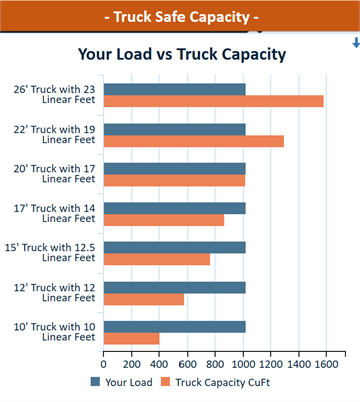
Truck Capacity chart comparing estimated load against truck capacity by truck size.

Compare your estimated load with common truck sizes before moving day using the Truck Capacity sheet.

Your Load is shown in blue, while each truck’s planning capacity is shown in orange. The built-in safety buffer helps you spot a tight fit early.

Open Truck Capacity Help

Inventory From Any Mobile Device

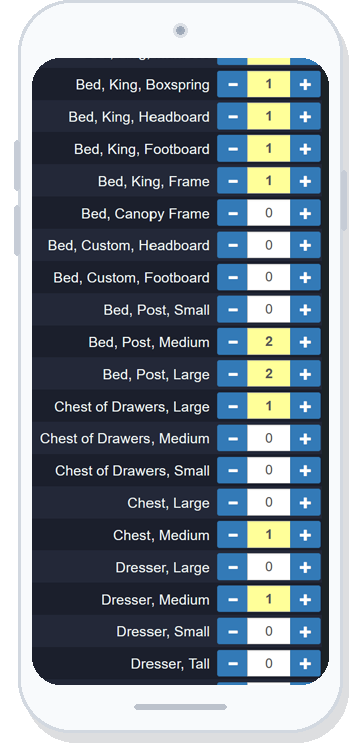
MoverCalcs Room Sheets inventory on a phone screen.

Easily take moving inventory with any mobile device.

Use Room Sheets on a phone to collect item counts, inventory details, and notes. Walk room by room, add what you know, and let the estimate become more useful as the inventory gets clearer.

For comfortable one-handed entry, use your device in portrait mode and move between sheets with the hamburger button (☰). Want to see the whole sheet menu at once? Just turn the device sideways and the full menu appears.

Once you scroll down, a scroll-to-top icon appears at the bottom-left of the screen—tap it to jump straight back to the top.

Use Room Sheets

Better Inputs, Better Estimate, Better Move

Taking a real inventory is easy with MoverCalcs! Room by room, add what you see—counts, notes, and the details that matter—and the estimate gets clearer as you go.

MoverCalcs is also an easy way to communicate with your mover. Share the move and the details travel with it—right down to the room level—so everyone is looking at the same plan.

Use it as a tool to capture logistics early: assembly, disassembly, placement, access notes, truck capacity, supplies, and billing. That means fewer surprises for you and your movers on moving day.

Check truck capacity · Review billing inputs

Save, Load, and Email Your Move — On Your Terms

Save, load, and email your move while keeping full control over where it goes. MoverCalcs uses your own email program, so you decide when, how, and with whom to share the file.

Once you load a move, MoverCalcs keeps working offline. Continue taking inventory and updating details wherever you are—even when you have no signal.

Your phone can keep the move available, but saving a backup copy to your device is quick, smart, and easy. Reload it whenever you need it and keep your work protected.

Learn how your move is shared · Explore MoverCalcs Help

Contact MoverCalcs

Have a question, comment, or inquiry for MoverCalcs? Send a message here.

    MoverCalcs · Planning tools for clearer moves · © 2026 MoverCalcs